FEMA
- 4.5
- Rating
- 1.00M
- Installs
- Free
- Price
 Analysis by App-foxy
When severe weather is developing, I do not want a flashy forecast screen that only tells me whether to carry an umbrella. I want practical information that helps me decide what to do next. FEMA is a free weather and emergency-preparedness app from the Federal Emergency Management Agency, and its purpose is much more serious than ordinary day-to-day forecasting. After using it, I see it as a companion for alerts, planning, and basic disaster readiness rather than a complete replacement for a detailed weather service.
That distinction matters. FEMA is not trying to win me over with entertainment, elaborate maps, or endless forecast charts. Its focus is helping people prepare for hazards and respond with more confidence. The store summary, “Take charge of disasters,” captures the direction, but the useful question is whether the app earns a place on your phone when nothing unusual is happening. In my experience, it can, especially if you use quiet periods to prepare before an emergency makes every decision harder.
What FEMA actually offers and where its value comes from
The app belongs in the weather and emergency information category, but I would not judge it by the same standards as a conventional weather app. A typical forecast tool is built around temperatures, hourly conditions, radar, and precipitation timing. FEMA is more valuable when the concern is a serious hazard and the user needs clear guidance instead of a dense collection of weather layers.
You May Also Like

 Blood Strike: 2.5 Anniversary
Blood Strike’s Loadouts Turn Every Drop Into a Tactical Gamble
A close look at Blood Strike’s custom loadouts: how fast access to signature weapons reshapes its battle royale rhythm, rewards preparation, and narrows the gap between fights.

 Pandora - Music & Podcasts
Pandora’s Music Is Easy to Start, but Harder to Recover
Pandora’s strength is its low-effort path from a seed to a station. Its weak spot is how much confidence it asks you to place in connection, setup, and quiet recovery.

 8 Ball Pool
 Is Built on Rivalries, Rematches, and Routine
A close look at the rivalries, rematches, shared routines, and unanswered safety questions that turn a quick pool match into a persistent mobile community.

 Samsung Music
’s Quiet Strength Is Playing What You Already Own
Its reach comes less from spectacle than from dependable access to a personal library. That simplicity is both the app’s strongest retention engine and its ceiling.

 AccuWeather: Weather Radar
AccuWeather Review: A Quick, Clear Forecast for Everyday Decisions
For everyday plans, the best forecast is the one you can understand quickly. AccuWeather makes rain timing, radar, and local conditions easy to act on, with a few trade-offs.

 Hill Climb Racing
Why Hill Climb Racing Still Turns Crashes Into One More Run
A tiny car, a bumpy hill and one more upgrade: Hill Climb Racing keeps resurfacing because its simple chaos makes every near-miss feel personal.
More From Our News Desk



It is developed by the Federal Emergency Management Agency, which gives the app a distinctly public-service role. That does not automatically make every screen perfect, but it does explain the practical tone. The experience is aimed at helping ordinary people understand risks and prepare households, rather than encouraging constant browsing. I found that difference useful because emergency information is easier to act on when it is presented as a sequence of decisions instead of a stream of technical data.
The app is free, so there is no purchase decision standing between you and its basic value. That is important for a disaster tool. A preparedness resource is most useful when family members, roommates, or neighbors can install it without discussing a subscription or a one-time fee first. The free access also makes it reasonable to keep FEMA installed even if you use another app for everyday forecasts.
Its audience is broad. The content rating is Everyone, and that feels appropriate: the subject matter can be serious, but the app is designed for general users rather than specialists. I would be comfortable recommending it to someone who has never made an emergency plan, while also seeing a role for it on the phone of a more prepared user who wants a government emergency resource close at hand.
Public reception is encouraging without being a reason to stop thinking critically. FEMA holds a 4.4 average from around 5.7 thousand ratings, with roughly 1.9 thousand written reviews and more than a million installs. Those figures suggest that many people find it worthwhile, but they do not tell me whether it fits every location, device, or emergency routine. The useful test is whether its information matches the way you personally prepare.
Why the free price changes the recommendation
Because FEMA costs nothing, I judge it by a different standard from a paid utility. I am not asking whether it replaces every other weather product; I am asking whether it provides enough emergency value to justify a few minutes of setup and occasional attention. For most people, the answer is yes. The downside of keeping a free preparedness app available is small, while the benefit can become significant when a hazard affects your area.
Free does not mean frictionless, though. You still need to open the app, understand its organization, and decide which information applies to your household. An app cannot prepare a go-bag, check on an elderly relative, or choose an evacuation route for you. FEMA is best viewed as a tool that supports those actions. If you install it and never explore beyond the first screen, you are getting only a fraction of its practical value.
I also would not interpret the free price as proof that it is the only weather app you need. People who depend on precise short-term forecasting may still prefer a specialist service with richer radar, local observation detail, or more customizable visualizations. FEMA’s value is not that it makes those tools irrelevant. Its value is that emergency preparation is often missing from ordinary forecast apps, and this app makes that part easier to keep within reach.
Useful preparation before an emergency begins
The strongest way to use FEMA is before you need it. I would open it on a calm day, review the information relevant to my home, and make notes about what needs to be done offline. That workflow turns the app from something I glance at during a crisis into a reference I have already understood. In an emergency, stress makes unfamiliar menus feel slower, so early exploration is a practical advantage.
One non-obvious benefit is that the app can prompt a household conversation. Instead of vaguely saying “we should be ready,” I can use the information as a checklist for questions: Where would we meet? Who needs help leaving? Which documents or medicines should be easy to reach? What would we do if power or mobile service became unreliable? The app does not replace those decisions, but it gives them a concrete starting point.
A second useful workflow is to separate digital information from physical preparation. I would read the relevant guidance, then write down the most important actions or keep them somewhere accessible offline. This matters because a phone may have a low battery, poor reception, or a damaged screen during a serious event. FEMA is helpful as a planning aid, but relying on any single app at the moment of danger is a mistake.
A third insight is that preparedness should be adjusted for the people who share your home, not just for the person holding the phone. A household with pets, mobility limitations, young children, or medication needs has different priorities from a household of healthy adults. FEMA is more valuable when I use its guidance to identify those differences rather than treating disaster readiness as a generic list.
The app can also help users who have recently moved. Someone new to an area may not know which hazards deserve attention or what questions to ask local authorities. FEMA gives that person a starting point for learning how to think about emergencies in a new location. I would still check local official communications, but the app can reduce the blank-page problem that often prevents people from preparing at all.
How it fits beside everyday weather apps
My usual weather app would remain the better choice for deciding whether rain is likely during a commute or whether temperatures will change throughout the afternoon. Those apps are built for frequent forecasting decisions. FEMA serves a different layer: what to consider when conditions become dangerous, how to prepare, and how to respond more deliberately.
That comparison reveals both the strength and the limitation. FEMA is less likely to satisfy someone who wants a highly visual forecast dashboard, minute-by-minute precipitation, or a large amount of local weather detail. In return, it is more focused on the human consequences of hazards. I would keep both types of app if weather affects my work, travel, or family responsibilities. They are complementary rather than direct substitutes.
Compared with searching the web during a crisis, a dedicated app has a simpler advantage: I already know where to look. Search results can be crowded with outdated articles, commentary, advertisements, or advice written for another region. FEMA offers a more focused route to emergency information. That does not mean I should ignore local authorities, but it does mean I am less dependent on remembering the right search terms while worried or distracted.
There is also a trade-off between broad official guidance and local specificity. A federal resource can be useful across many situations, but local emergency management offices may provide details that matter more for a particular neighborhood. I would use FEMA to build general readiness and then save local alert channels, shelter information, and contact details separately. That two-layer approach is more dependable than expecting one app to know every local condition.
Trade-offs that affect everyday use
The main friction is that FEMA rewards intentional use. It is not the kind of app I would open repeatedly for entertainment or casual browsing. If you want a constantly updating weather feed with visual detail, its focused emergency role may feel limited. I see that as a design trade-off rather than a failure, but it still matters when deciding how much space the app deserves on your phone.
Another limitation is the gap between information and action. Reading preparation advice can create a reassuring feeling without changing anything at home. The app cannot verify that your supplies are usable, that everyone knows the plan, or that your emergency contacts will answer. I get the most value when I treat each relevant piece of guidance as a prompt to do something tangible, then stop using the screen and complete that task.
Version 3.1.5 is the current version, and the listed minimum operating system is Android 5.1. That makes the app accessible to a wide range of Android devices, including some older phones. Still, anyone using an older handset should pay attention to ordinary practical concerns such as available storage, battery condition, and whether the device remains reliable enough for emergency use. Compatibility alone does not make an aging phone a dependable backup.
The app’s age is also worth putting in context. It was released on August 24, 2011, so it has had a long presence as a FEMA mobile resource. Longevity can be reassuring, but it also means I would not assume that an app alone reflects every current local procedure. Emergency information changes, and users should continue following current instructions from local officials when a real incident occurs.
I would skip FEMA if my only goal is a polished daily forecast and I already have a weather app that meets that need. I would also avoid treating it as a substitute for emergency calls, evacuation instructions, or local alerts. In a life-threatening situation, the correct action is to follow current official directions and seek immediate help when needed. The app is a preparation and information aid, not a personal emergency dispatcher.
Who is most likely to get real value from it?
FEMA is a strong fit for people who have never made a disaster plan, families who want a shared starting point, and anyone living in an area where severe weather or other hazards are a realistic concern. It is also useful for renters and students, who may not control the building but still need to know how they and their belongings would be protected. The free price removes an easy excuse for postponing basic preparation.
I would particularly recommend it to someone who tends to prepare only after an alert appears. That habit is understandable, but it leaves little time for thoughtful decisions. Installing the app early, reviewing the relevant guidance, and turning it into a short household checklist is a better pattern. Even if you never face a major event, the exercise can reveal missing contacts, unclear responsibilities, or supplies that were assumed to be available but are not.
It is less suitable for professional users who need specialized meteorological tools, detailed operational mapping, or industry-specific emergency systems. Those users may need products designed around their work rather than a public preparedness app. FEMA can still be a useful general reference, but it should not be mistaken for a complete professional platform.
For parents, the best use may be planning around communication and care rather than asking children to navigate the app themselves. I would review the material as an adult, translate the relevant actions into simple household rules, and make sure children know who to contact and where to go. The Everyone rating makes the app broadly accessible, but accessibility is not the same as making every emergency decision easy for a child.
For older adults or relatives who are not comfortable with smartphones, the app can still support a family member who helps with planning. I would not assume that installing it on one person’s phone creates a household plan. Instead, I would use it during a conversation, write down the agreed actions, and make sure the final plan is available to everyone who may need it.
My practical routine for getting more from FEMA
My recommended first session would be short but deliberate. I would install the app, look through the emergency topics that matter to my location, and identify the actions that require preparation outside the phone. I would then check whether my household has a way to communicate, a meeting idea, and access to essential items. The point is not to memorize every screen; it is to convert useful guidance into decisions.
Next, I would review the plan with the people who might need to follow it. This is where many emergency apps lose their practical impact: one person reads everything while everyone else remains unaware. A shared conversation exposes problems early. Someone may work far from home, a pet may need transport, or a family member may need extra time to leave. Those details are more important than simply knowing that an app is installed.
I would also keep a second source of current information available. FEMA can sit alongside local emergency management channels and a regular forecast app. During an active event, I would compare the general preparedness guidance with current local instructions, rather than relying on an old screen or a remembered recommendation. This is a simple but important trade-off: broad guidance helps me prepare, while local alerts tell me what is happening now.
Finally, I would revisit the plan after major life changes. A new address, new medication, a different work schedule, or a new pet can make an old plan incomplete. FEMA is most useful when it becomes part of that occasional review process. It does not need to dominate my daily routine, but it should not be forgotten after installation either.
My verdict on installing it
FEMA is an easy recommendation for preparedness, not a universal replacement for weather forecasting. Since it is free and intended for Everyone, the value equation is favorable for most Android users who want a reliable starting point for disaster planning. Its strongest contribution is helping turn vague concern into specific preparation, especially for people who have never created a household plan.
I would install it if I wanted emergency guidance close at hand, if I had recently moved, or if my family needed a structured conversation about hazards and responsibilities. I would keep my regular weather app as well, because daily forecasts and emergency preparedness serve different needs. I would also save local official resources and maintain offline notes for the moments when a phone or network may not cooperate.
I would skip it only when I already have a well-maintained preparedness system and have no interest in an additional general reference, or when my expectations are limited to detailed daily forecasting. Even then, the free access makes trying it a low-risk choice. The app will not do the hard work for you, but it can make that work easier to begin and easier to organize.
Overall, I see FEMA as a practical public-service app whose value appears before the emergency, not just during it. Its rating of 4.4 and audience of over a million installs show broad interest, while its real strength is more personal: it gives me a place to start thinking clearly about preparation. Used alongside local alerts, ordinary weather tools, and an offline household plan, it earns a place on my phone.
FAQs for FEMA
01What is the FEMA app and what does it offer?
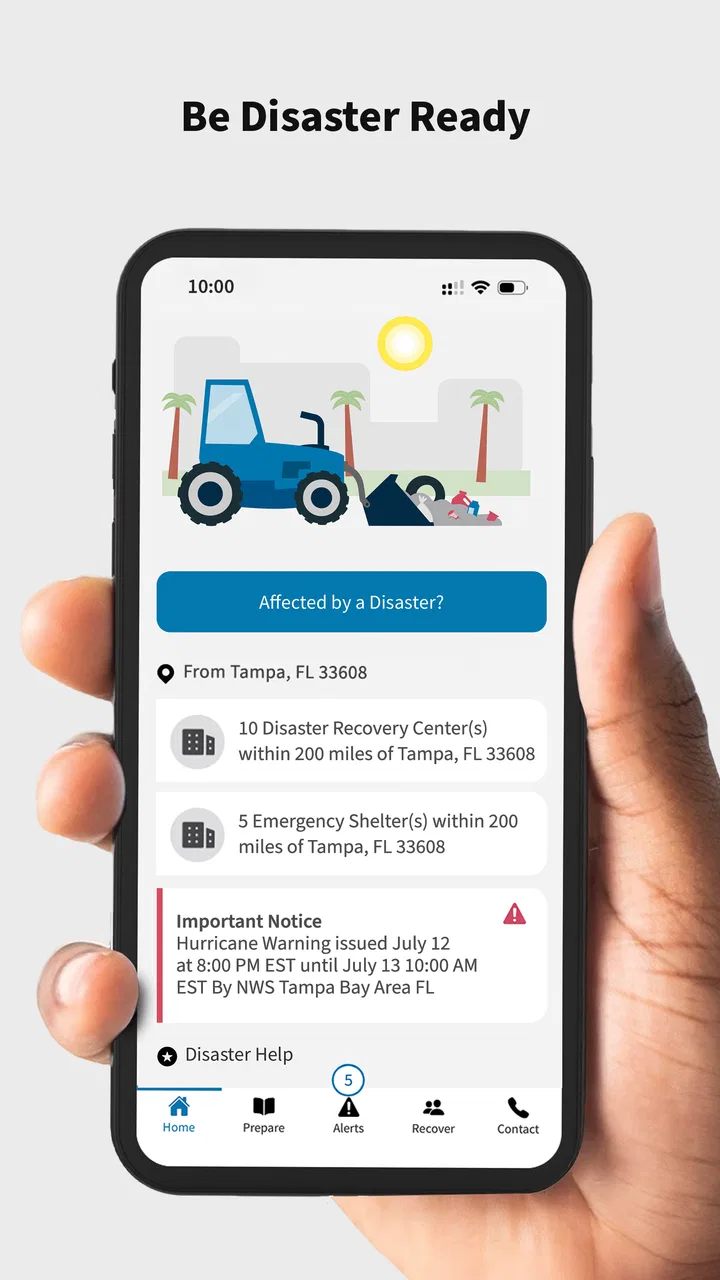
The FEMA app, developed by the Federal Emergency Management Agency, provides crucial information about emergency preparedness. It offers features such as weather alerts, disaster resources, safety tips, and a map of nearby shelters. Users can also receive personalized alerts and share information with family and friends before, during, and after emergencies.
02Is the FEMA app free to download and use?
Yes, the FEMA app is completely free to download and use on both Android and iOS devices. It does not contain any in-app purchases or ads, ensuring that users can access vital emergency information without any cost or distractions, making it an essential tool for preparedness.
03How can I receive customized alerts through the FEMA app?
To receive customized alerts, users need to enable notifications and enter their location details within the app. The FEMA app allows users to set up multiple locations, such as home and work, ensuring they receive timely alerts about severe weather and other emergencies relevant to their specified areas.
04Does the FEMA app work without an internet connection?
While some features of the FEMA app require an internet connection, such as real-time alerts, the app also provides offline access to essential information like safety tips and emergency checklists. This ensures users can access critical resources even when the internet is unavailable during a disaster.
05How frequently is the information in the FEMA app updated?
The FEMA app is regularly updated to ensure users have access to the most current information. This includes real-time alerts and disaster resources. Users are encouraged to keep their app version updated to benefit from the latest features, improvements, and security patches.
Pros
- Comprehensive emergency alerts
- User-friendly interface
- Available in multiple languages
- Customizable notification settings
- Real-time weather updates
Cons
- Limited offline functionality
- Battery drain with constant use
- Some alerts may be delayed
- Requires location access
- Limited customization for alerts

FEMA
Gallery